Category Archives: iPhone

Liquid Glass – you can turn off SOME of this $#@!

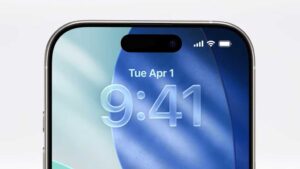
iphone with new display image
Iphone with Liquid Glass in iOS26


Apple released iOS 26 a few months ago. And with it, a slew of new features and transparency that no one asked for. As if a small handheld display was hard enough on the eyes, this new iOS26 LiquidGlass (more like Ass than Glass) defines the arrogance of change for you, whether you wanted it or not.

Let me explain that some are questioning why the move or jump from iOS  18  to iOS 26? Plans of the leadership at Apple! Make it less confusing for already their dumbing down of customers, to make the iOS and MacOS on the same number (a year! how clever! Wait, Microsoft has been doing that. So has EA Sports games! )

So yes, you noticed, iOS 26 (for 2026, but released in 2025?).

Now, let’s just go to settings and turn off some, but not all, of the new features, shall we?

Reduce transparency in IOS:

Open the Settings app, scroll down and tap on Display & Brightness. Now tap on Liquid Glass.

Choose from Clear or Tinted. Choose the second option to limit Liquid Glass. Apple says, “Clear is more transparent, revealing the content beneath. Tinted increases opacity and adds more contrast.”

Choosing this change won’t walk your iPhone back to the look of iOS 18. Backgrounds in pop-up windows are much less clear, but they aren’t completely opaque.

Open the Settings app on your iPhone and head to Accessibility > Display & Text Size, then enable the toggle next to Reduce Transparency. You’ll notice that this immediately cuts out a lot of the glass-like effects in iOS 26, such as the translucent Dock and app folders.

Disable Large ScreenCapture Previews:

Open the Settings app and navigate to General > Screen Capture and disable the toggle next to Full-Screen Previews. From now on, you’ll go back to seeing the miniature preview in the corner of your iPhone whenever you take a screenshot.

Disable Background in Messages:

Select Settings -> Apps > Messages, then find the Conversation Backgrounds toggle and disable it. This will restore the plain white background from before iOS 26 on all your threads.

Spatial Scenes in Lockscreen and Photos:

Start off by long pressing your Lock Screen, then tapping Customize. To the left of the … button should be a hexagonal icon that contains a landscape scene – tap it to disable the effect. You can do this with other images by tapping the background thumbnail in the bottom-left, selecting Choose Photos, then picking an image and tapping the same hexagonal icon to disable the Spatial Scene.

To prevent Photos from turning your images into Spatial Scenes in the first place, open the Settings app and go to Apps > Photos, then scroll to the bottom and disable the toggle next to Control for Creating Spatial Photos.

Call screening and call waiting:

Spam calls – Apple has taken steps to combat them in iOS 26. In the form of call screening—which forces unknown callers to identify themselves before they get though to you, giving you the option to decline the call—and call waiting, which sits on hold on your behalf before ringing back when you’re through to a human.

You might decide that these features aren’t right for you. If you don’t get much spam (Ha!) and would rather not inconvenience people calling you, you might want to disable call screening, for example. (Note that it only works on unknown callers, so your family and friends would probably never encounter it.) Thankfully, that’s easy to do in iOS 26.

To turn off call screening, open the Settings app and head to Apps > Phone. Scroll down to the Screen Unknown Callers section and tap Never. Alternatively, you can choose to silence calls from unknown numbers completely and send them to voicemail, or just stick with Ask Reason for Calling.

For call waiting, you’ll find options for this in the same Phone menu. Next to Detect Call Waiting, simply disable the toggle to deactivate the feature.

Classic Look in Phone calls:

Change from Unify to Classic via the three lines in upper left. Open the Phone app and select the menu icon at the top right of the screen. In the window that pops up, check the “Classic” option. Your app should now change back to the older (less transparent) look.

Change the App Icons

App icons in the Liquid Glass look lose their individual colors and become more uniform, hindering easy identification and readability. Here’s how to change that.

Press and hold on your Home Screen. Tap the “Edit” icon in the top-left corner. Choose “Customize” from the dropdown menu. For the classic look, click the “Default” option. Your icons should revert to the way they were.

Finally a Tidbits primer on how to turn off Liquid Glass and its effects!

(Thanks to Macworld’s Alex Blake; Louis Roundtree @ Appletoolbox, via Google search, for these tips)

And like a gullible Apple fool, I’m a new iPhone 17Pro owner…

iphone image
iPhone 17Pro in Midnight Blue (c) Apple.com

So I finally was able to find a local Apple store that had in stock, a 256GB model that was unlocked. Helpful Apple staff at the Menlo Park Mall store explained that stock was low for this model all over, but that the 512GB and 1TB models were plenty. Also, getting one unlocked was rare too, as most stock was for carrier models (ATT/tMobile/VZW). Thus explaining the reason I couldn’t find an unlocked, 256GB model.

I took the phone home and did the upgrade/transfer without Apple support. I had a backup but the transfer of putting new next to old worked well with ONE BIG CAVEAT: your MFA apps like Google Auth, Duo, MS and Y Auth, do NOT carry your settings over! I am so glad I had my old phone and DID NOT WIPE to get all my accounts reconfigured. I think I should have just did a restore from my iTunes encrypted backup. However I don’t know how that would go from a iOS 15 version to the iOS 26 if so on the new iPhone.

Quick Summary: its much snappier with Carplay, but issues now point to my Mazda infotainment than the phone. Magsafe charging, USB-C connection and phone holder is much better than previous SE2020 which had no Magsafe, was still Lightning connector, but did charge slowly on a Qi charger. Its wider than the SE and thus my jeans side pockets have some issue with fit (so far just the one pair). Fit my 5.11 pants fine on side or front pocket. Camera is wonky to get focus on close versus far objects – macro kicks in too slow. I don’t mind the blue but with a case, its moot. I keep hitting the mic button on texting… Apple’s keyboard in Messages is still subpar.

Why do my songs STILL have artwork issues? I’ve tried a web suggestion to delete all art and restore but somehow some artists albums get wrong art from Apple?

To be continued in a few months…

iPhone 17 released on Sept 19th…I still can’t get one!

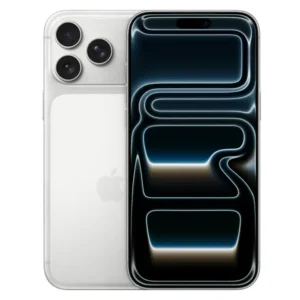
iphone front and back
iphone 17Pro Max in silver

Apple released the iPhone 17 models for availability on Sept 19th, 2025

As of Oct 6th, I still cannot buy one in the store. Any Apple store. Atleast the 12-15 that are within my 100mile radius.

I suspect that the reason is, I want the Pro model, not the Max, and with 256GB of storage. And unlocked from all carriers. I don’t want ATT. Nor Verizon or Tmobile. I want an unlocked phone because… I want to add eSim second number to the phone. You cannot add another number, via eSim without it being unlocked from the carrier. If I place an order for one from Apple, it shows that I can have the phone by Oct 28th. Which is more than a month since Apple announced it being available to the public.

Contacting ATT store, they have stock. Called Verizon store, they have stock. BUT only for them, as carrier.

Also note that lower models, not the Pro or Pro max, you have to pay additional money to have an unlocked phone. So that iPhone 17 or iPhone Air, unlocked, is more than the advertised price.

Apple is quiet about this.


March Madness: New iPhone 16e, iPad and iPad Air, Macbook Air and Mac Studio

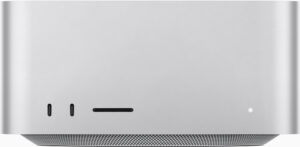
Apple Mac Studio Pro computer
Mac Studio Pro

This month, Apple without much fanfare, released the replacement to the iPhone SE model as the iPhone 16e. And A18 processor in an aluminum frame similar to the iPhone 14. A new model, the C1, an inhouse Apple modem. No more home button. That is gone. Downside is that its more than the SE 2020 (3rd edition) in cost. Apple is selling this as base model iPhone 16e 128GB for US$599. The previous SE 2020 (64GB) was US$429.  So US$171 more.  YMMV.

Update: Youtubers and review sites, Reddit, all pretty much agree that the price is a disappointment. The SE was the “affordable” iPhone. Tim Cook says “its affordable!” but only when you compare it to the $US1200 models. Sure! It’s 50% less! One lens vs three! Ok, it has USB-C. Face recognition. Better but not brighter display. And again Apple engineers its prices in that you can’t get a refurb model 15 or even 16. Shame on you Apple.

Next, Apple announce something in the Air teaser and it was the iPad Air, along with the iPad models (starting at US$299 and 128GB storage/wifi). There is also a new Magic Keyboard for the new models. The Folio for the iPad is…well..US$249..almost as much as the iPad. Apple prices its accessories and tablets to not compete with its laptops. Think Different? More like Think Next Model to upgrade to.

Then Apple released the new MacbookAir M4. This model is light, offered in Sky Blue now, and more memory and cheaper by US$100 versus last M3 model. Ready for Apple Intelligence, longer battery life. 13″ and 15″ model sizes. This is the notebook you need if you write, surf, facetime or zoom, and do lightweight work.  And lightweight it is. If I needed a notebook, this would be ideal.  I can see students snapping this up. Ok, only 2 USB-C ports, a magsafe port and headphone jack port (I’d rather have one more USB-C/Tbolt port since “most” headsets are wireless buds or over the ear now.

And as of Wednesday, March 5th 2025, the next announcement is the Mac Studio Pro in M4Max and M3 Ultra.  Pricier. Really pushing Apple Intelligence. No longer can you get base model with 64GB as you need to bump up to more cores. I’ve an Mac Studio M2Max model, 64GB and 2TB that was US$2699 (8/3/2023). That  same configuration for the M4Max model, 64GB and 2TB today  is US$3299. Why is this model now US$600 more??? 0.8x faster than…my current M2Max. Oh and it now has Thunderbolt5 ports. Two more cores than my M2Max. Ok, so Wifi6, and 10Gb included, with Bluetooth 5.3. Not going to say it loudly but, not worth US$600 more. Oh and the trade in value of my computer to Apple?… US$1006.

I can wait till the M7Max… wonder if my Applecard will still get 0% financing in 2028…

2023 – RIP DarkSky

Dark Sky app icon

RIP Dark Sky, I knew you well.
Well, until Apple bought it in 2020.
Then it was nothing but sadness. About 4 months ago, after an iOS update, I noticed a 1/2023 warning on the app on my phone. It was a subtle reminder that I should be using Apple’s Weather app instead.

Weather has improved with iOS 15 and now iOS 16. You can have lock screen widgets showing precipitation and temp. You could with Dark Sky but it was hit or miss depending on your phone and iOS level.

weather app with sun right, behind a cloud

The new Weather app has some nice features, as the lock screen will change with the weather… moody grey, or morning clouds or dusk. Even 10pm at night shows a cloud with dark sky. If you open Weather and touch the hourly forecast, you will see a visual chart of the temp. Touch the tiny thermometer and you now have choices such as wind and precipitation with measurements every 6hours. Close that (hit the X ) and you return to main screen. There, if you scroll down past the clutter of a map (See, this is where Dark Sky shined… the local map gave radar and not a clutter of state names, cities and towns).
And below that map, are a section of the same chart choices, but in sections that you can access as well as via the hourly section.

I can’t blame the creators of Dark Sky for “selling out”. I mean, afterall, Apple was their market and they were a dev for them. I just hope they run into a weather situation that the new Weather app, well, missed. Because money can’t buy happiness. But it can buy a roof that doesn’t leak or blow away.

iOS 14.1 to iOS 14.2 a whopping 4.8GB


Apple has updated the iOS 14 again (first it was 14 then 14.1 with important bug fixes, and now 14.2…all within less than 60 days).

14.2 security changes (note, you can’t download the update, but have to use over the air, or iTunes to install).

There are a host of new features like Intercom, new Emoji, Music Recognition, Optimization of AirPod Charging, improvement to new Ipad-Air camera features, Apple Watch App changes, Applecard update and new wallpapers…personally, I just want to know why my iPhone has to have Privacy off for wifi network at work (Aruba networks Access Points) as it was fine prior to iOS14 and now, is it Aruba needing patch or Apple making changes without notification…again.

One more thing, it took over 30 mins to update! Do NOT do an update unless you can spare 1/2hr or more…!